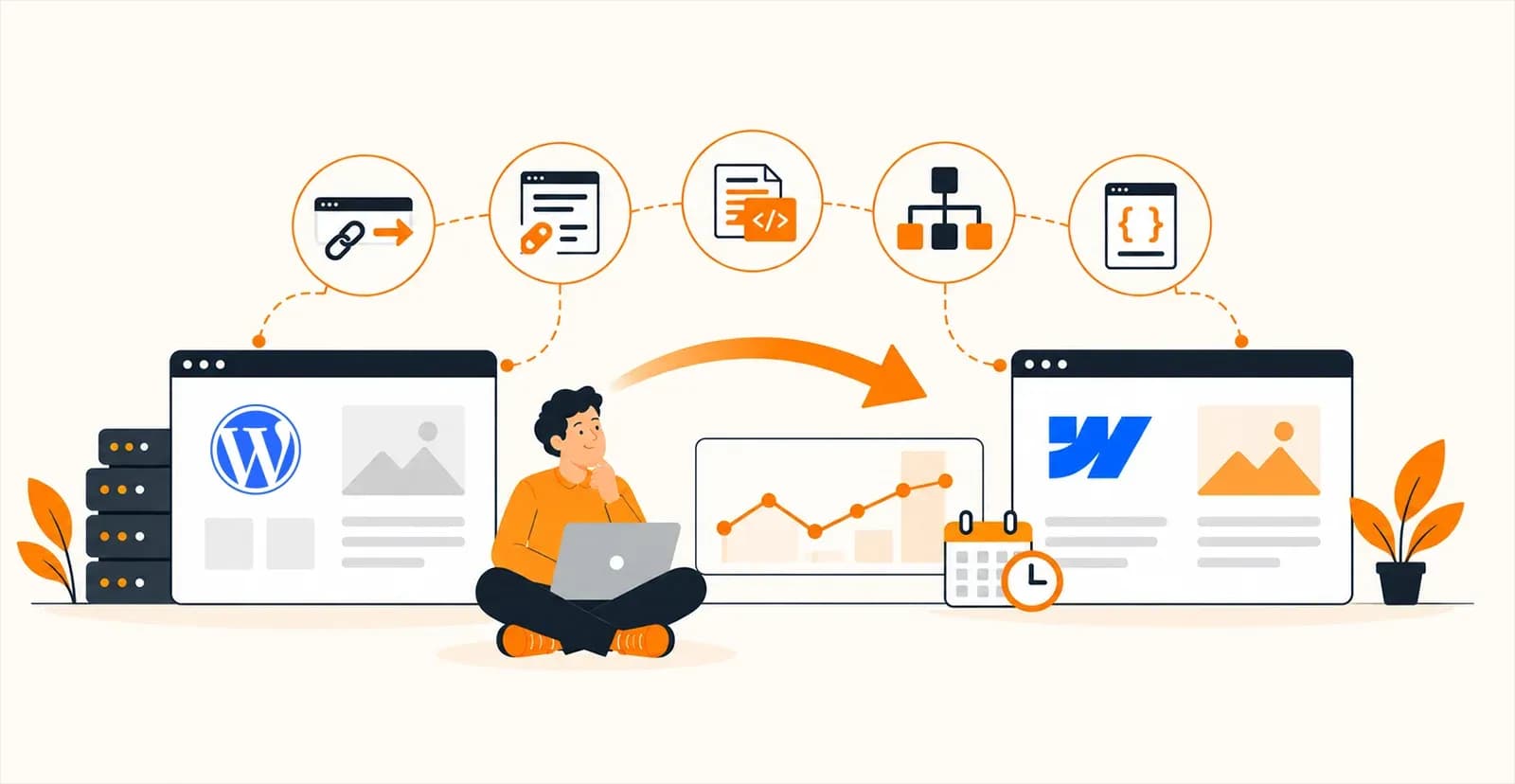


TLDR
- Webflow development for B2B and SaaS websites costs between $5,000 and $150,000+ in 2026, with most marketing websites in the $15K to $60K range. Hidden costs like Webflow plans, premium apps, maintenance, and ongoing SEO can add $10K to $50K+ annually.
- The primary business case for Webflow over traditional development is marketing independence: content teams can publish pages, update CMS collections, and launch campaigns without waiting on engineering, which reduces time-to-market and eliminates the developer bottleneck that slows most B2B websites.
- A typical Webflow build follows seven stages: discovery, UX/UI design, Webflow development, CMS implementation, third-party integrations, SEO implementation, and QA/performance testing. The full process takes 4 to 10 weeks for most marketing websites.
- Webflow is the right choice for marketing websites, lead generation sites, and content-driven platforms. It is not the right choice for customer dashboards, subscription portals, or applications with complex backend logic. Use Webflow as the frontend and connect backend systems through APIs when application-level features are needed.
- The most common post-launch challenge is poor CMS architecture. If collections are designed around current content instead of future growth, the site will need workarounds within a year and a full rebuild within two to three years.
Your highest-converting product page has been stuck in a developer's backlog for three weeks. Your competitor shipped theirs on Tuesday. If that sounds familiar, this guide is for you.
For years, WordPress dominated the B2B website market with its flexibility, huge plugin ecosystem, and low cost of entry. But as SaaS and B2B businesses scaled, the cracks showed. Every routine change was routed through engineering, so websites drifted out of date, campaigns stalled, and marketers couldn't update high-value pages without waiting on someone else. Research from the IBM Institute for Business Value found that technical debt can drag ROI down by 18-29%, and for most B2B businesses, that debt reached well beyond the software product into the marketing website itself.
This is why Webflow gained ground. Where traditional platforms lean on plugins and ongoing development, it brings visual development, enterprise-grade hosting, a structured CMS, built-in SEO controls, and managed infrastructure under one roof.
Whether you need Webflow development for a new SaaS website, are weighing a migration from WordPress, or are looking for a faster way to power continuous marketing, this guide is your starting point.
What is Webflow development in 2026?
Webflow development is the process of designing and building production websites on Webflow's visual platform, which generates clean HTML, CSS, and JavaScript while supporting custom code, APIs, and advanced integrations. It lets marketing teams manage content independently while developers focus on product, removing the engineering bottleneck that slows most B2B and SaaS websites.
This model is a departure from conventional website builders, which box you in. Most run on prefabricated templates, leaving little room to shape the site around your brand voice and business needs.
Webflow works differently. It gives developers the freedom to build custom APIs, write code, and wire up advanced integrations. For B2B and SaaS teams, that split changes everything. Marketing manages content on its own, without queuing behind IT. Developers stay focused on product features instead of maintaining marketing pages.
Still comparing platforms? Our breakdown of Webflow vs WordPress vs Framer covers cost, SEO, and upkeep side by side in this blog: "Webflow vs WordPress vs Framer: What Should Businesses Pick In 2026?"
Key Features That Make Webflow Suitable for B2B and SaaS Websites
While traditional website builders are still in use, Webflow brings more competitive advantages that you won’t find anywhere else. So, before you start planning for development, let’s have a walkthrough of the unique features that make Webflow a better fit for designing a B2B or SaaS website in 2026.
1. Visual development without sacrificing code quality
Webflow uses a visual development environment. It generates clean, production-ready code, rather than relying on rigid templates. Thus, you can easily build and update high-quality web pages in no time. Whether it’s a new product page, a campaign ad, or a feature launch page, everything can go live without you competing for engineering resources. As a result, your marketing initiatives will stay aligned with product releases. That lean markup is a big part of why Webflow sites load faster than WordPress builds of the same design.
2. Enterprise-grade CMS for marketing teams
With Webflow, you get a built-in CMS where you can manage dynamic content, like blogs, case studies, comparison pages, resource libraries, and customer stories. Your marketing teams can publish and update the content without relying solely on developer support. Thus, you can enable constant SEO execution, faster campaign launches, and continuous production even when your engineering teams are focused on product development. Before you plan content, it helps to understand how Webflow CMS collections and templates work, and where they stop scaling.
3. Scalable design systems
Webflow supports reusable components, global styles, and shared layouts across the entire website. You no longer have to edit hundreds of pages individually. Rather, just update the common element, and the changes will be reflected on every page where it has been used. This alone reduces maintenance costs, preserves brand consistency, and simplifies website expansion.
4. Built-in SEO controls
Webflow provides native control for meta tags, canonical URLs, schema markup, redirects, XML sitemaps, robot settings, and Open Graph data. Your marketing team can easily implement SEO recommendations at the earliest without waiting for the development sprints. To top it off, faster optimization will improve searchability and help new landing pages generate qualified traffic early. We cover Webflow's SEO strengths and gaps in detail, including what still needs manual work.
5. Responsive design capabilities
With Webflow, you can customize website layouts for desktop, tablet, and mobile breakpoints individually. This will ensure pricing pages, forms, navigation, and product information remain the same and easily accessible across all devices. A consistent browsing experience will support longer engagement and reduce friction among your users.
6. Advanced animations and interactions
In Webflow, you will get visual tools for creating interactive product demos, feature walkthroughs, scrolling effects, and customer journey animations. These elements help explain complex SaaS products without requiring lengthy text or videos. Jasper and Osmo Supply are two SaaS companies with standout Webflow websites that use motion to explain the product.
7. Localization and multilingual support
You can also use Webflow to manage multiple languages and localized website experiences from within a single platform. Whether you want to optimize content for local search, create region-specific landing pages, or tailor messaging for different markets, this website builder has got everything covered.
Webflow vs Traditional Development: Which Approach Makes More Business Sense?
For B2B and SaaS companies, Webflow offers greater business value, especially when you deal with a marketing website. That’s because its built-in features minimize development time, lower maintenance overheads, and accelerate campaign execution by allowing marketing teams to design product launches or promotional events independently. However, traditional development remains a better fit when you want a highly customized web app or have to work on a complex backend system.
If you want to learn more about the differences between Webflow vs custom website development, and what you should choose, read this blog, "Webflow vs Custom Development: When Should Your Business Move Beyond Webflow?"
Factor | Webflow Development | Traditional Development |
|---|---|---|
Primary use case | Marketing websites, SaaS websites, and lead generation | Web applications, SaaS products, enterprise systems |
Average launch timeline | 4–10 weeks | 3–9+ months |
Initial investment | Lower | Higher |
Cost of future updates | Low | Moderate to high |
Marketing independence | High | Low |
SEO implementation | Native controls | Usually code- or plugin-dependent |
Design flexibility | High | Unlimited |
Backend functionality | Limited to integrations and custom code | Fully customizable |
Third-party integrations | Native apps, APIs, automation tools | Unlimited via custom development |
Scalability | Excellent for content and marketing growth | Excellent for application and infrastructure growth |
Performance optimization | Built-in CDN, hosting, image optimization | Depends on the development and hosting setup |
What Is The Complete Webflow Development Process? A Step-By-Step Guide
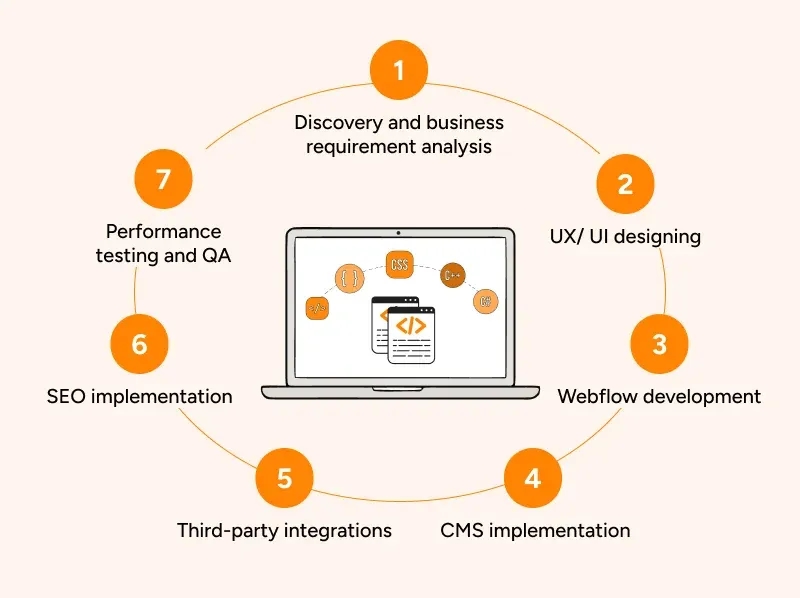
Here, we have explained the stages involved in Webflow website development so that you can move strategically and build a product that can generate business revenue much faster.
Step 1: Discovery and business requirement analysis
Start by defining how the website will support your business growth once you move it into production. Every decision, from what the website needs to achieve to who will manage it after launch, will directly influence the project costs, scalability parameters, and long-term maintenance hassles. So, before you move ahead, focus on the aspects below to have a clear roadmap in hand.
- Define measurable goals, like demo bookings, SQL generation, or self-service signups
- Map the buyer journey and identify the pages required at each stage
- Decide which pages will be static and which will use Webflow CMS Collections
- Audit the existing website to identify migration requirements and content gaps
- Identify future expansion plans, including multilingual content, new product lines, or additional microsites
Step 2: UX/ UI designing
With Webflow, you can design a fully custom interface around your brand voice and conversion strategy. So, ensure you design every page with future scalability in mind so that you won’t have to invest in a complete rebuild later. Build reusable sections for pricing, testimonials, CTAs, feature blocks, and formats. Always prioritize pages that influence revenue, like product, comparison, and demo pages.
Make sure to create a responsive design so that your website can function uniformly across tablets, desktops, mobiles, or any other device. Standardize typography, colors, spacing, and UI components to simplify future expansions. Lastly, validate the UX design with marketing and sales teams before proceeding further.
Step 3: Webflow development
During this stage, the approved UI designs are translated into a fully functional marketing website within Webflow’s visual development environment. Developers can easily recreate each page using HTML, CSS, and JavaScript that the CMS automatically generates. They do not have to build every page independently. Rather, they can create reusable Components, Variables, and global styles that simplify future updates.
Responsive layouts are then configured to cater to different screen sizes, while navigation menus, forms, animations, and user interactions are implemented. In case the project needs functionalities beyond Webflow’s native features, you can plan custom code or API integrations before preparing the website for content population.
Step 4: CMS implementation
The CMS ensures that creating new content won’t require changes to the page layouts or development support. It’s more valuable for a B2B or a SaaS company as they have to publish new blogs, case studies, industry pages, webinars, and customer success stories to show growth and credibility. The CMS implementation includes the following:
- Creation of Collections for blogs, case studies, resources, careers, events, and integrations
- Defining structured fields to ensure every page follows the same format
- Building Collection Templates that can generate new pages automatically
- Configuration of categories, tags, authors, and related content relationships
- Planning URL structures that support both SEO and future scalability
Step 5: Third-party integrations
After the website structure gets finalized, Webflow is connected with the business systems that support marketing, sales, analytics, and customer engagement. This further enables faster lead generation, reporting, automation, and customer engagement. A typical Webflow implementation includes:
- Connecting HubSpot, Salesforce, or another CRM platform for lead capture
- Integrating Google Analytics 4 and Google Tag Manager for performance tracking
- Configuring marketing automation platforms for lead nurturing
- Connecting meeting schedulers to reduce friction in demo bookings
- Integrating AI chatbots or agents for lead qualification and customer support
Step 6: SEO implementation
Technical SEO is directly implemented within Webflow for the website. Unlike traditional CMS, it offers more optimization features natively. Developers can therefore optimize page titles, meta descriptions, and heading hierarchy properly for better indexing.
XML sitemaps are then created along with the configuration of adequate robots directives. Also, Webflow ensures canonical tags can be defined early to help prevent content duplication. After launch, our Webflow website development work on SAA Interiors + Architecture recorded 57% organic clicks and 89,975 impressions in 5 months.
Step 7: Performance testing and QA
Before launch, the completed website undergoes thorough QA and testing to identify issues that can affect user experience or business performance. Below are some of the key areas that are covered in the assessment.
- Lead capture forms and CRM synchronization
- Analytics, conversion tracking, and event measurement
- Responsiveness of the layouts across major devices and browsers
- Reviewing page load speed, Core Web Vitals, and image optimization
How Much Does Webflow Development Cost in 2026?
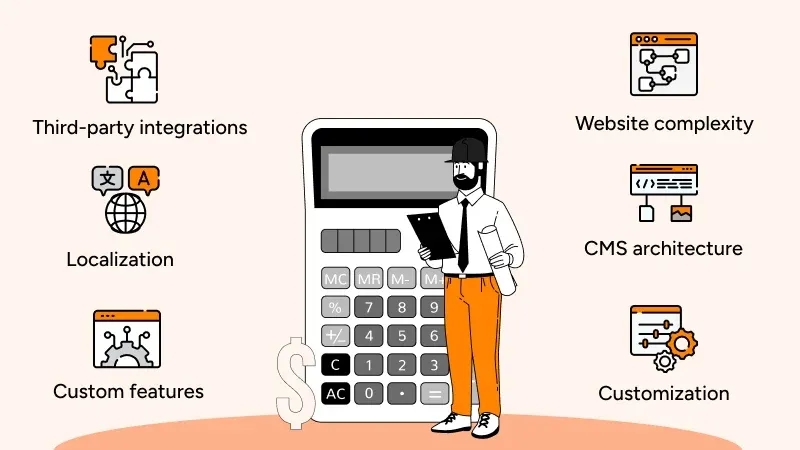
For most B2B and SaaS companies, the Webflow development cost in 2026 ranges from $5K to $150K+. The actual cost depends on multiple factors, including the CMS architecture, website complexity, and even the integrations you plan to include. Apart from these direct cost drivers, hidden expenses like building premium apps, content migration, and continuous optimization also get billed. That’s why you must have a full picture beforehand so that budgeting can be accurate.
Factors affecting project pricing
The different technical and business requirements influencing the Webflow development cost in 2026 are as follows:
- Website complexity: Dynamic pages, advanced interactions, and custom functionalities require more engineering effort and time as compared to a standard marketing website
- CMS architecture: Filtering, multiple Collections, relationships, and searchable content hubs automatically increase implementation efforts and the timeline.
- Customization: Bespoke interfaces take longer to build than template-based or design-system-driven websites
- Third-party integrations: Connecting CRMs, marketing automation, payment gateways, or AI tools will increase the project scope and hence the budget.
- Localization: Supporting multiple languages requires additional CMS configuration and SEO planning.
- Custom features: Calculators, pricing configurators, or API integrations require a high level of customization and engineering effort
Cost Factor | Typical Price Impact (US) | When You'll Need It |
|---|---|---|
Website complexity | +$2,000–$15,000 | You need interactive product pages, calculators, pricing configurators, or advanced user journeys. |
CMS architecture | +$1,500–$8,000 | Your website includes blogs, case studies, resource centers, integrations, careers, and documentation. |
Custom UI/UX design | +$3,000–$20,000 | You want a unique brand experience instead of a template-based website. |
Third-party integrations | +$500–$10,000+ | Your website must connect with HubSpot, Salesforce, GA4, Stripe, AI chatbots, or other business tools. |
Localization | +$2,000–$15,000 per language | You're expanding into multiple countries and need localized content and SEO. |
Custom features | +$1,500–$25,000+ | Your website requires features unavailable through native Webflow functionality. |
Moving an existing site? The real cost of a WordPress to Webflow migration adds redirect mapping and content cleanup to these ranges.
Hidden costs founders often overlook
It’s not just the development costs that you need to consider for your Webflow project. Apart from these, you also have to be concerned about the hidden expenses that usually appear in the form of recurring numbers. Below is a tabular breakdown of these factors and why you need to consider them.
Hidden Cost | Typical Annual Cost (US) | Business Impact If Ignored |
|---|---|---|
Webflow Workspace & Site plans | $300–$5,000+ | Teams may outgrow plan limits, affecting collaboration and publishing. |
Premium Webflow apps | $200–$3,000+ | Advanced website features may not function without paid extensions. |
Third-party software | $1,000–$20,000+ | Lead management, analytics, and automation workflows become incomplete. |
Website maintenance | $2,000–$15,000+ | Outdated content and unresolved issues gradually reduce website performance. |
SEO & CRO optimization | $3,000–$30,000+ | Organic traffic and conversions can stagnate despite increasing marketing spend. |
Content production | $2,000–$25,000+ | Publishing slows, affecting SEO growth and thought leadership. |
Team training | $500–$5,000 | Teams remain dependent on agencies for routine website updates. |
What Are The Challenges for Webflow Development (And How To Address Them)
1. Choosing the Wrong Content Architecture
Once product pages, case studies, resources, or industry pages grow, poor CMS planning will lead to duplicate work and higher maintenance costs. That’s because you considered these to be static pages at the time of roadmap design. So, the key here is to design Collections around future content, not the current assets you have. By doing so, you can keep your website scalable and won’t have to invest in future rebuilds. Left unfixed, this is one of the first signs your Webflow project needs a rebuild.
2. Outgrowing Webflow's Native Functionality
Webflow truly excels when you design a marketing website on this platform. However, if you need customer dashboards, account management, subscription portals, or complex business workflows, there will be numerous limitations. Rather than forcing these features into Webflow, use it as the frontend. As for the dedicated external applications, you can connect them with your website using APIs or subdomains.
3. Maintaining a Scalable Component Library
After the website moves to production, your marketing teams may have to add new sections to every landing page to accommodate your growing business. However, if you didn’t design reusable Components and Variables, inconsistency will soon surface. The best way to address this challenge is to establish a component library early, as it can reduce future design and development efforts.
4. Balancing Custom Code with Native Webflow Features
Adding excessive custom JavaScript, third-party scripts, or external libraries is likely to reduce the benefits Webflow brings specifically for B2B and SaaS businesses. Not only will it make future upgrades difficult, but it will also increase technical debt. So, use native Webflow functionality wherever possible and reserve custom code for genuine business requirements.
5. Controlling Website Governance Across Multiple Teams
As your B2B company grows, marketing, product, regional teams, agencies, and executives will publish website content simultaneously. Without any properly defined publishing permissions, shared design systems, and approval workflows, brand consistency will soon deteriorate. That’s why you configure role-based access before content production begins.
Conclusion
Webflow has now evolved into a strategic platform for B2B and SaaS companies requiring scalable marketing websites without creating unnecessary engineering dependencies. Its visual development environment, enterprise CMS, built-in SEO capabilities, and extensive integration ecosystem make it perfect for organizations focused on faster time-to-market and continuous optimization.
However, maximizing its value will need thoughtful planning, from CMS architecture and design systems to integrations and governance. So, it’s only by understanding both the strengths and limitations of Webflow that you can make informed technology investments.
Ready to build a scalable Webflow website?
Whether it’s launching a new B2B or SaaS website, migrating from WordPress or modernizing an existing digital presence, the right implementation strategy. That’s why Quixta combines Webflow expertise with UX design, SEO best practices, and integration capabilities to build websites that can support measurable business growth.
Frequently Asked Questions
Most B2B and SaaS businesses can see measurable ROI within 3-9 months, given the website acts as their active revenue channel. Returns stem from faster campaign launches, reduced engineering involvement, improved organic traffic, and higher landing page conversions. Once you start publishing content continuously, optimizing the pages, and testing CTAs periodically, you can easily recover the initial investments made faster.
As an early-stage SaaS startup, you should invest in a Webflow website when it becomes a primary source of demos, free trials, and inbound leads for your business. That’s because a scalable website will help your marketing teams to launch campaigns, update messaging, and support product releases without having to rely on the IT teams. Delaying the investment might cause technical debt to grow further and increase the migration costs.
Yes, Webflow supports ABM by enabling you to build personalized landing pages, industry-specific solutions, partner pages, and campaign microsites without rebuilding the entire website. Once you integrate it with platforms like HubSpot, Salesforce, or Marketo, it will become easier for you to deliver targeted messaging, measure campaign performance, and respond faster to new sales opportunities.
Yes, you can use Webflow as the presentation layer while connecting it to CRMs, customer data platforms, analytical tools, marketing automation, and backend applications through APIs or middleware. This approach will help your organization to modernize the customer-facing website without replacing existing business systems or disrupting operational workflows.
You should track metrics that can demonstrate business impact rather than website activity. Focus on qualified leads, demo requests, free-trial sign-ups, landing page conversion rates, sales pipelines generated, and customer acquisition costs. Monitoring these KPIs will help you determine whether your Webflow website can contribute directly to revenue growth and marketing efficiency.
Webflow delivers the greatest value to industries depending on content marketing, frequent product upgrades, and lead generation. SaaS, technology, fintech, healthcare technology, cybersecurity, manufacturing, and professional services companies benefit the most. That’s because their marketing teams can regularly launch campaigns, publish educational content, and update websites independently.
Businesses are increasingly adopting AI-assisted content creation, reusable component libraries, localization, composable integrations, and optimization for AI-powered search. Instead of redesigning websites every few years, you can continue to launch landing pages, improve conversion rates, and expand content libraries. This shift will make your website more adaptable to changing customer expectations and search behaviors.
Migration will be a better strategy when your website starts limiting business growth and does not support it. Frequent plugin conflicts, slow publishing workflows, rising maintenance costs, poor website performance, and heavy reliance on developers indicate that it’s time to move from WordPress to Webflow. Planning the migration before a rebrand, product launch, or internal expansion will minimize disruptions and protect SEO performance.
Yes, Webflow offers the technical foundation required for AI-powered search through semantic HTML, structured content, schema markup, clean URLs, and faster page loading. While AI visibility still depends on content quality and authority, Webflow makes it easier for you to implement the technical practices and improve discoverability across modern search engines.
Choose the hiring model based on your long-term business needs. Freelancers work well for smaller websites or minor updates. A specialized Webflow agency is a better choice for custom B2B and SaaS projects requiring strategy, UX integrations, and SEO. Build an in-house team only if website development remains a continuous operational task throughout the year.



.jpg&w=3840&q=75)